


Slap Beat
3.857.00 Reviews
App Specs
- Version
- 1.09
- Updated On
- License
- Free
- Downloads
- 1,000,000+
- Developer
- FourM Inc.
- Categories
- Arcade
- Platform
- Android, iOS
Screenshots
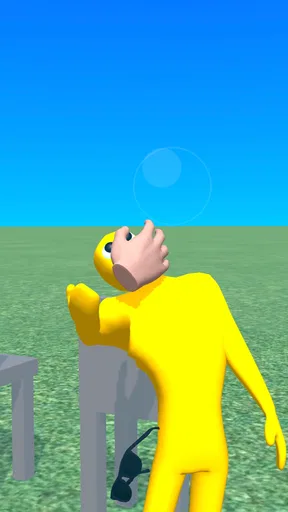
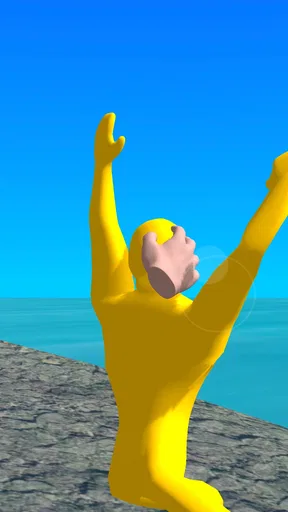
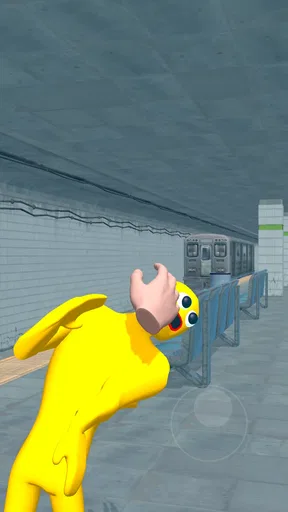
 Analysis by AppCompare
Slap Beat is the kind of small arcade game I open when I want an immediate action loop rather than a long tutorial, a story campaign, or a complicated control scheme. Its basic idea is easy to understand: slap and pat enemies in time with the action. That simplicity is both its appeal and its biggest limitation. You can begin quickly, but the game also gives you less room for strategy than a traditional action game.
After spending time with it, I see the best use case as a short break: a few rounds while waiting for a bus, relaxing after work, or handing a simple game to someone who does not want to learn a large control system. It is free, belongs to the arcade category, and is made by FourM Inc. The age rating is Everyone 10+, so it is aimed at a broad audience while still being more suitable for older children and adults than for very young players.
Why the first few minutes can be more confusing than expected
The store summary makes the central action sound almost self-explanatory, but a short description does not tell you how carefully you need to read the screen. In a game built around slapping and patting enemies, the important question is not simply where to tap. It is when to tap, which target deserves attention, and whether the game expects a quick reaction or a more deliberate touch.
That is where I think some players may get stuck. The concept is simple enough to invite careless tapping, yet the arcade format rewards attention. If you treat every enemy as an invitation to press immediately, you can miss the intended rhythm of the encounter. My practical advice is to spend the opening moments watching the movement pattern before trying to play quickly. That small pause helps you understand whether your problem is timing, target selection, or an unresponsive touch.
Another early point of friction is the difference between a game that feels slow and one that is waiting for a precise input. When a tap appears not to work, I do not immediately assume the game has failed. I first check whether I touched the active target, whether my finger covered the visual cue, and whether I pressed during the correct moment. On a small phone, even a straightforward arcade screen can become harder to read if the display is crowded or your hand blocks part of it.
The most useful beginner habit is to watch one complete interaction before trying to optimize it. This is not a deep tutorial technique; it is simply a way to avoid turning the first session into random tapping. Once I understand the expected response, I can play more consistently and tell the difference between my own mistake and a genuine input problem.
What I would check before blaming the controls
Before judging the game, I make sure the screen is clean and that I am holding the phone comfortably. A damp fingertip, a thick screen protector, or a case edge that makes it awkward to reach the display can make a tap-based arcade game feel worse than it really is. I also avoid playing with one hand if that hand is covering the area where enemies appear.
Worth Reading Before You Choose

EA SPORTS FC Mobile 26 Is a Bigger Football Game, but It Takes Time

Flipboard Shows What News Apps Must Do Beyond the Feed

Switching to Android Auto Means Rethinking Your Driving Routine

Google Calendar Makes a Crowded Week Easier to Manage

Ludo King Makes the Most of the Minutes Between Plans

Baby Panda World Brings Quick Play to Modern Phones, but Its Game Library Feels Busy
It helps to close anything that is competing for attention. If a notification arrives during a short action sequence, the interruption can break concentration and make the next input feel late. I would also check the phone's touch response in another simple app. If taps feel delayed everywhere, the issue is probably not specific to Slap Beat. That basic comparison saves time and prevents an unfair verdict.
The game supports devices running Android 7.1 or later, which makes it accessible to many older phones. That does not mean every device will feel identical. Screen size, touch sensitivity, background activity, and available storage can all affect how comfortable an arcade game feels. I would keep the system current where possible, but I would not assume that a newer phone automatically solves every control issue.
A sensible setup routine for a first session
My setup routine is deliberately short. I install the game from the official app source, open it with a stable connection available, and let the first launch finish without repeatedly switching away. I then check whether the touch areas are easy to see in the current brightness and orientation. If the display feels cramped, changing the way I hold the phone is more useful than tapping harder.
The current version is 1.09, so I would also check that the installed build matches the latest version offered to me. An update can matter when a problem is caused by an older build, but updating is not a universal cure. If the same behavior remains afterward, I would continue with basic checks rather than repeatedly reinstalling without a plan.
Because the game is free, it is easy to install casually and forget about it. I still recommend checking the available storage before downloading, especially on an older device. A nearly full phone can behave unpredictably during installation or while switching between apps. Free access is convenient, but it does not remove ordinary device maintenance.
One useful setup choice is to play the first session in a quiet environment. That may sound obvious, but the game depends on visual attention, and possibly on the player's sense of timing. A crowded commute can make a simple arcade challenge feel unfair when the real issue is distraction. I would test it once in a calm setting before deciding whether the gameplay itself suits me.
Recovering when progress or a session feels wrong
When a round feels broken, I use a gradual recovery process. First I stop tapping for a moment and look at the full screen. Then I leave the active screen normally if the game provides a clear way to do so, reopen the game, and try again. If the issue affects only one session, a clean restart may be enough. I avoid repeatedly pressing the same place because that can make it harder to tell whether the game is responding.
If the game does not react at all, I check whether the phone itself is responding to other touches. I also close demanding background apps and reopen Slap Beat. On an older Android device, reducing background load can improve general responsiveness even when the game is not especially demanding. This is a sensible troubleshooting step because it tests the phone environment without changing the game unnecessarily.
Reinstalling should be a later step, not the first one. A reinstall can remove local app data, so I would only use it after trying a restart and checking the device. If I do reinstall, I make sure I remember any settings or progress that matter to me. I would not assume that reinstalling restores a particular session or preserves everything automatically.
There is also a difference between a visual glitch and a failed input. If an enemy appears frozen but the rest of the phone works normally, I would close and reopen the game once. If the screen is merely busy while the action continues, I would wait briefly instead of tapping repeatedly. This approach is especially helpful in a game where rapid input can make a timing mistake look like a technical fault.
When the game is not the real cause of the problem
Some complaints that sound like game issues begin with the phone. A device running many apps, overheating, or struggling with storage can make touch interaction feel inconsistent. A weak battery-saving mode may also change how the phone behaves in the background. I cannot fix those conditions from inside the game, so I check them separately before deciding that the arcade controls are unreliable.
Network conditions can create another misleading impression during installation or startup. If the game takes a long time to open, I test the connection with another app and try again later if necessary. I do not keep pressing the screen while waiting for a page or action to finish, because that can create a second problem once the game catches up.
Touch hardware is worth considering too. If the same part of the display fails in other apps, Slap Beat is unlikely to be the root cause. A cracked screen, an unsuitable protector, or a phone that is registering touches poorly will affect any tap-based game. In that situation, changing games may hide the problem temporarily, but it will not solve the underlying device issue.
Notifications and accidental gestures can be especially disruptive during short arcade sessions. I prefer to silence unnecessary alerts and avoid holding the phone near the edge of the screen. This does not add a feature to the game; it simply gives the controls a fair test. If the experience improves immediately, the friction was probably coming from the surrounding phone environment.
How it compares with other arcade choices
Compared with a platform game, Slap Beat asks for less movement planning. You are not learning a large map or managing a character across several kinds of terrain. That makes it easier to pick up during a brief break, but it also means there is less exploration for players who enjoy discovering levels and building a long-term route through a game.
Compared with an endless runner, its appeal is more focused on the immediate interaction than on steering through a continuously changing course. Runners can offer a stronger sense of momentum and personal improvement over longer sessions. Slap Beat is better suited to someone who wants the action to stay close to the tap itself and who does not need a large progression system to remain interested.
It also differs from puzzle arcade games. Puzzles usually reward planning and careful deduction, while this game is more about reacting to what appears in front of you. If I want to unwind with slow decision-making, I would choose a puzzle title instead. If I want a quick test of attention without reading instructions for several minutes, this is the more direct option.
The trade-off is replay value. A compact mechanic can be satisfying when I am in the right mood, but it may not hold my attention for a long uninterrupted session. I would recommend treating it as a pick-up-and-play title rather than expecting the depth of a full action game. That expectation makes the experience feel more honest and more enjoyable.
Who will enjoy it, and who should skip it
I think Slap Beat is a good fit for players who like quick reactions, simple touch controls, and arcade sessions that can begin without a long commitment. It is also a reasonable choice for families looking for a free game with an Everyone 10+ rating, provided the player is comfortable with a fast, repetitive action loop rather than a story-driven experience.
I would be more cautious about recommending it to someone who wants detailed character development, complex controls, online competition, or a substantial campaign. The central slap-and-pat idea is intentionally narrow. That narrowness is useful for accessibility, but it can feel repetitive if you expect many different activities from one game.
It is also not my first choice for a player who dislikes timing-based input. Even when the controls are easy to understand, the challenge comes from responding at the right moment. Someone who prefers turn-based games or calm building games may find the repeated reactions tiring rather than relaxing.
For a realistic everyday example, I can see myself opening it while waiting for an appointment. I would play a short session, stop without needing to remember a complicated story, and return to whatever I was doing. I would not choose it for a long evening dedicated to gaming, because a larger arcade or action title would probably offer more variety over that amount of time.
What the numbers suggest about its place in the arcade category
The game has passed one million installs, which tells me it has reached a sizeable audience for such a focused concept. Its average rating is 3.8 from around two thousand ratings, with 57 written reviews. I read that combination as a sign of a game that appeals to some players immediately but may not satisfy everyone looking for more depth or polish.
Those figures do not replace personal testing. A player who enjoys short touch challenges may rate it more generously than someone expecting a complete action adventure. I would use the audience response as context, then decide based on the mechanic itself: do I want to tap targets, react quickly, and accept a compact arcade experience?
The free price lowers the risk of trying it, but it does not guarantee that every phone or every player will enjoy it. I would install it when I want a lightweight experiment, not because I expect a premium-scale game at no cost. That distinction is important when deciding whether a brief, focused title deserves space on my phone.
My practical verdict after testing the experience
Slap Beat works best when I approach it on its own terms. It is a straightforward arcade game from FourM Inc. with a clear physical idea, quick access, and a control style that can be understood without a large rulebook. Its strongest quality is immediacy: I can get to the central action quickly and use it in small pockets of free time.
Its weaknesses come from the same design choice. A narrow interaction can become repetitive, and a missed tap can be difficult to diagnose when the screen is busy or the phone is slow. The game also is not the right replacement for a platformer, runner, puzzle game, or deeper action title when I want variety and extended progression.
My recommendation is therefore specific. Try it if you want a free, compact arcade game for short sessions and you enjoy improving your timing. Before judging the controls, test the phone's touch response, clear background distractions, and give yourself a quiet first session. If the basic slap-and-pat loop still feels repetitive after that, the problem is probably not setup; it simply may not match your taste.
For me, that makes Slap Beat a decent casual download rather than an all-purpose game. It earns a place on an Android phone when the goal is quick interaction and minimal commitment. I would keep expectations modest, use the troubleshooting steps above when a session behaves strangely, and choose a more expansive arcade alternative when I want longer-term variety.
Pros
- Simple tap controls make the game easy to learn quickly.
- Rhythm-based challenges offer engaging short play sessions.
- Bright visuals and energetic beats create an appealing arcade style.
- Increasing difficulty provides a satisfying challenge for skilled players.
- Works well for quick entertainment during short breaks.
Cons
- Timing can feel unforgiving when levels become more difficult.
- Gameplay may become repetitive after extended sessions.
- Some content or features may require in-app purchases.
- Ads can interrupt the experience between attempts or levels.
- Limited depth may disappoint players seeking a larger rhythm game.
FAQs for Slap Beat
What is Slap Beat and how does the gameplay work?
Slap Beat is a rhythm-based mobile game in which you interact with music by tapping, slapping, or following visual prompts at the correct time. The main challenge is maintaining accurate timing while the speed and complexity increase. After trying it, the controls feel easy to understand, but achieving high scores requires concentration, quick reactions, and consistent practice rather than simple repeated tapping.
Is Slap Beat free to download and play?
Slap Beat can generally be downloaded without an upfront purchase, allowing players to try the core experience before spending money. However, the free version may include advertisements, optional purchases, or limitations on certain content depending on the platform and current release. Before downloading, it is worth checking the store listing for pricing, in-app purchase details, and any restrictions in your region.
Does Slap Beat require an internet connection?
The basic rhythm gameplay in Slap Beat may be available without a constant internet connection, which is useful when playing during travel or in areas with weak coverage. Nevertheless, internet access can still be necessary for downloading the game, displaying advertisements, synchronizing progress, receiving updates, or accessing online features. Availability of offline play may vary between versions, so confirm the current requirements on your device’s app store.
Is Slap Beat suitable for children and casual players?
Slap Beat is approachable for casual players because its controls are simple and the objective can be understood quickly. Younger users may also enjoy its energetic presentation, although parents should review the age rating, advertising, optional purchases, and privacy information before allowing installation. The increasing difficulty can be challenging, but there is no need to be an experienced gamer to learn the basic mechanics.
What devices are compatible with Slap Beat, and does it perform well?
Compatibility depends on the version of Slap Beat available for Android or iOS, as well as the operating system requirements listed by the developer. On a reasonably modern phone or tablet, the game should provide responsive controls and smooth rhythm interactions, which are especially important for accurate timing. Older devices may experience reduced performance, limited compatibility, or delayed input, so checking the store requirements before downloading is recommended.


